
The complete guide to Thailand's digital arrival card (Thailand Digital Arrival Card)
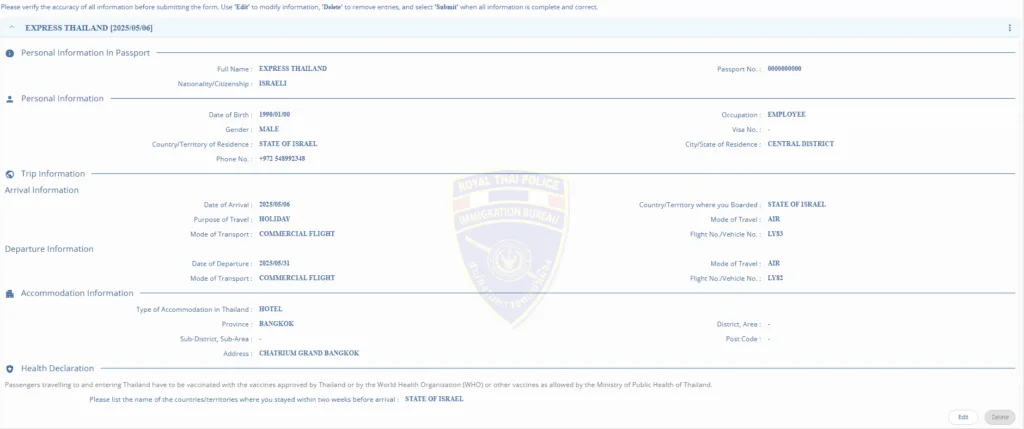
What is the digital arrival card?
Thailand's digital arrival card (Thailand Digital Arrival Card), or by its official name T.M.6 Digital, is the electronic version of the traditional immigration form that every passenger used to have to fill out manually on the plane or at the airport in the past. This form constitutes an official entry declaration to the Thai immigration authorities.
Starting from May 2024, the Thai government moved to a fully digital system, and now All passengers Those arriving in Thailand are required to fill out the form online Before You arrived.
Why do you need to fill out the form?
Filling out the digital arrival card is Required For every foreign citizen arriving in Thailand, regardless of the purpose of the visit (tourism, business, studies, etc.). The form is used by Thai immigration authorities for several purposes:
- Visitor identification, tracking who enters the country and for how long
- Collecting statistical information, for tourism purposes and national planning
- Health monitoring, checking travel history to identify health risks
- Simplifying the entry process, shortening wait times at passport control
Without a complete and valid form, you may be denied entry to Thailand or face significant delays at the airport.
When to fill out the form?
The digital arrival card must be filled out No more than seven days before your planned arrival date in Thailand, but No later than 12 hours before arrival.
Our recommendation is to fill out the form about 3-4 days before the flight, to make sure there's enough time to handle possible issues and avoid last-minute stress.
Important to know: Every passenger must fill out a separate form, including children and infants.
How do you fill out the form?, a detailed step-by-step guide
Step 1: Logging into the system and starting the process
- Go to the official website of the digital arrival card: https://tdac.immigration.go.th/arrival-card/#/home
- Choose your preferred language (the site supports several languages, but not Hebrew)
- Click "Create Arrival Card"
- Read the terms and tick the box to confirm your consent to the terms of use
- Enter your email address (note, the final form will be sent to this address)
Tip: Use an email address you can also access on your mobile, so you can show the form at the airport if needed.
Step 2: Filling in personal information
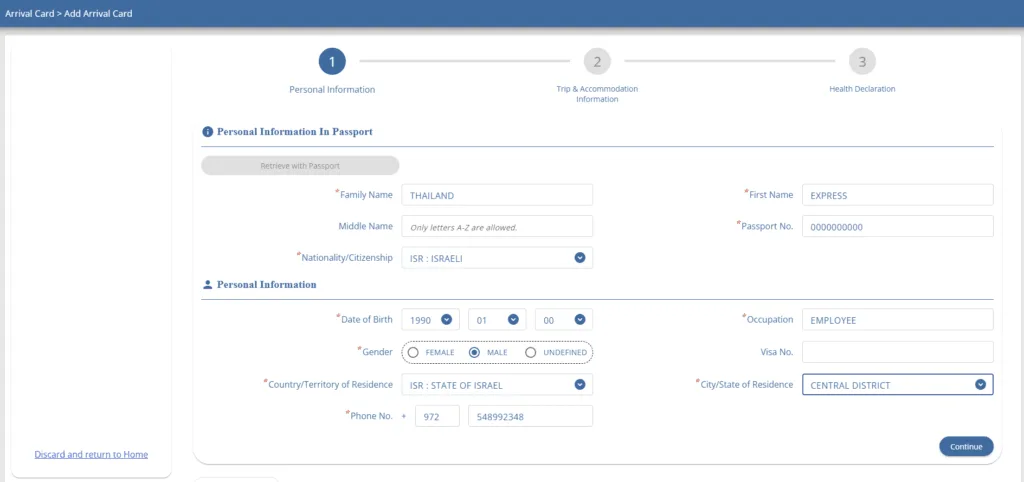
At this step you'll be asked to enter your personal details as they appear in your passport:
- Full name– as it appears in the passport
- Citizenship– Choose from the dropdown list
- Date of birth– In the format day/month/year
- Gender– Choose from the options
- Country of residence, where you permanently reside
- City/area of residence, your permanent city of residence
- Phone number, preferably a mobile number that will be available during the trip
Very important: Make sure all the details match exactly what appears in your passport, to avoid problems later.
Step 3: Filling in travel details
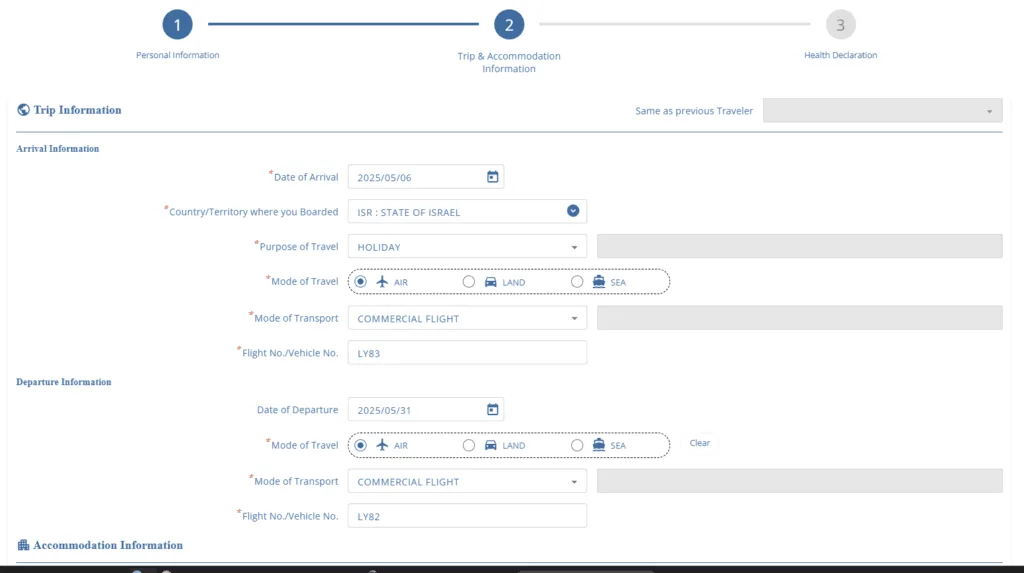
In this section you'll need to enter information about your arrival in Thailand:
- Arrival date, the exact date on which you land in Thailand
- Country of origin, which country you departed from on your last flight to Thailand
- Purpose of visit, choose from the options (tourism, business, studies, etc.)
- Means of transportation, usually "AIR" (flight)
- Type of transportation, usually "COMMERCIAL FLIGHT"
- Flight number, your flight number to Thailand
Next, also enter your planned departure details:
- Departure date, when you plan to leave Thailand
- Means of transportation for departure, usually the same as your means of arrival
- Departure flight number– If known to you
Tip: If you haven't booked a return flight yet or aren't sure of the exact date, state an estimated date. You can stay in Thailand for up to 30 days (for Israeli tourists) without a special visa.
Step 4: Information about your accommodation in Thailand
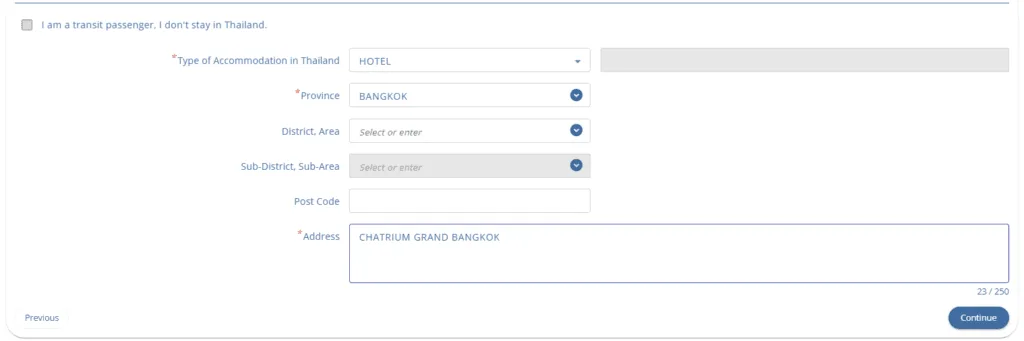
In this section you'll be asked to provide information about where you'll be staying in Thailand:
- Type of accommodation, choose from the options (hotel, hostel, Airbnb apartment, etc.)
- Province, choose the province where your accommodation is located
- Sub-region/district– If relevant
- Postcode– If known to you
- Address, enter the name of the hotel/accommodation and the exact address
Important tip: If you're planning to stay in several different places during the trip, state only your first accommodation.
Step 5: Health declaration
In this section you'll be asked to state the countries you were in during the 14 days before your arrival in Thailand, for health monitoring purposes.
If you were only in your country of origin (for example, Israel), simply state that.
Step 6: Summary and submission
In the final step:
- Check all the details you entered carefully and make sure they're accurate
- Read the declaration and confirm that all the information is true and accurate
- Click "Submit" to send the form
After successful submission, you'll receive a confirmation at the email you provided, with a PDF file of the completed arrival card.
Very important: Keep this confirmation! It's recommended to print a copy and keep a digital copy on your mobile phone.
Frequently asked questions
Is it mandatory to fill out the form in advance?
Yes, mandatory! Filling out the form in advance has been mandatory since May 2024. It's no longer possible to fill out paper forms at the airport or on the plane.
What happens if I didn't fill out the form before arrival?
In that case, you'll need to fill out the digital form at the airport in Thailand before you can pass through passport control. This may cause significant delays, and in some cases even denial of entry.
Do children need to fill out a separate form?
Yes, every passenger, regardless of age, needs a separate form. Parents or guardians can fill out the form for their minor children.
What if I don't know the exact hotel address?
It's enough to state the hotel name and city. If you don't know the exact address, you can find it on the hotel's website or in your booking.
Can you edit the form after submitting it?
Yes, you can edit the form up to 24 hours before your planned arrival date in Thailand. Log back into the system with the same email address and passport details.
What if I have more than one accommodation during the trip?
State only your first accommodation. If needed, the authorities in Thailand are aware that tourists tend to move between different places.
Important tips and points
- Keeping a copy, after completing the form, keep a printed and digital copy (on your mobile device) of the confirmation
- Return flight ticket, make sure you have a return flight ticket or an onward ticket to your next destination, as stated on the form
- Exact dates, make sure the entry and exit dates on the form match your flight tickets
- Arriving on time, arrive at the airport earlier than usual for your flight, especially during busy tourist seasons
- Internet, make sure you have internet access on your mobile at the airport (via Wi-Fi or a data plan)
Summary
Filling out Thailand's digital arrival card is a relatively simple process, but it's important to be precise with the details and fill it out on time. The new form is designed to streamline the entry process to Thailand and shorten wait times at the airport.
Make sure to fill in all the required fields accurately, keep a copy of the final confirmation, and arrive well prepared for your perfect vacation in Thailand!
Official link to the digital arrival card: https://tdac.immigration.go.th/arrival-card/#/home
This article was last updated on May 4, 2025. The information presented is based on the most current regulations and procedures of Thailand's immigration authorities. Regulations may change, and it's recommended to always check the official website for the most up-to-date information.